
Configuration
DigitalPets settings live in /digitalpetssetup.
Run /digitalpetssetup as an admin. That panel is where you tune everything, and Save applies it to every player straight away.
Use Reset in the panel if you want the defaults back.
The panel
The first time you open it, a short tutorial plays. The sidebar is grouped like this:
| Group | Pages | What you decide |
|---|---|---|
| Raising | Life, Needs, Care, Rarity | How long an egg takes, the level cap, how fast stats drain, what each care button restores and how long it cools down, and the odds of an Ultra or Shiny hatch |
| World | Shop, Visits, Pedometer, Outings, Spots | The coin shop, nearby visits and gifts, step counting, landmark trips, and map zones that cheer certain species up |
| Handheld | Handheld | The prop model, the animation, and the bone it attaches to |
| General | General | Debug and the inventory item name |
Overview and Review pages sit on top as a checklist and a list of pending changes, so you can see what you are about to save.
For Outings and Spots, stand where you want the point and press the panel's position button. It grabs your coordinates and the zone name for you.
What the settings mean
You rarely need to change these, but here is what they do.
| Setting | Plain English |
|---|---|
Item | The inventory item name. Defaults to digital_pet |
StarterName | The name shown before a player renames their pet |
HatchMinutes | How long the egg waits before hatching. Default 15 |
MaxLevel | Level cap. Default 50 |
DaysUntilDeath | Real days of neglect before the pet dies. Default 30 |
NeedDrain | For each need, how often (Every, seconds) it drops and by how much (Lose) while the toy is closed |
Care | For each button, how much it restores (Fill), the cooldown in seconds (Wait), and the XP it gives (Xp) |
Rarity | Percent chance of Ultra and Shiny. Ultra is rolled first |
Shop | Enabled, plus the item list. Each item needs a unique id, a label, a cost in pet coins, and a happiness value |
Visit | Enabled, how close two players need to be, and the size and cooldown of gifts |
Pedometer | Enabled, the steps needed for the Walk bonus, and the soft session goal |
Outings | Enabled, the cooldown, arrival radius, whether it sets a waypoint, the reward, and the list of places |
FavoriteSpots | Enabled, the happiness tick, its cooldown, and zones tied to a species trait (beach, city, or wild) |
Handheld | Prop models, a fallback, the animation, and the bone |
Debug | Extra logging. Leave off on a live server |
Custom shop items can use an https:// image or a nui://<resource>/... path. The stock toys use bundled art.
Items
One usable item. The name must match Item.
| Item | Label | |
|---|---|---|
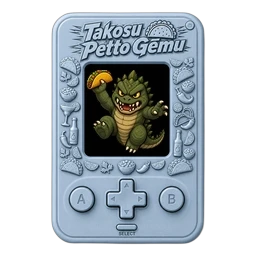 | digital_pet | Digital Pet |
Paste: Item setup. Icon: Item images.
Commands
| Command | Who | What it does |
|---|---|---|
/digitalpetssetup | Admin (framework admin or group.admin) | Opens the setup panel |
/givealldigitalpets | group.admin | Gives you one hatched pet of every species. Handy for testing |
Players have no commands. They just use the item.
Giving pets from other scripts
A pet is just an item, so add it the way you would add any other.
-- inventory agnostic, through Newb_Bridge
bridge.inventory.addItem(source, 'digital_pet', 1)

-- or ox_inventory directly
exports.ox_inventory:AddItem(source, 'digital_pet', 1)
It arrives as an egg and hatches after HatchMinutes. You can sell it in any shop script, hand it out as a job reward, or drop it in loot like a normal item.
Events and callbacks that start with MrNewbDigitalPets: are the UI talking to the server. Do not build on them.